Carry Code v0.7.5
Release Date: March 12, 2026
Version: 0.7.5
Commits: 121 commits since v0.7.4
✨ Major New Features
Section titled “✨ Major New Features”1. 🌐 Browser Automation Tool (core_browser)
Section titled “1. 🌐 Browser Automation Tool (core_browser)”Powerful built-in tool for web automation, enabling AI to interact with web pages:
| Action | Description |
|---|---|
navigate | Navigate to URLs with policy validation |
click | Interact with page elements |
type | Input text into form fields |
extract | Extract structured content from pages |
screenshot | Capture page screenshots |
evaluate | Execute JavaScript in page context |
trace_start/trace_stop | Record interaction traces |
close | Clean up browser sessions |
Key Features:
- Session Pool Management: Multi-session support with automatic cleanup
- URL Policy Validation: Configurable domain whitelist and scheme blocking
- No Confirmation Required: Streamlined workflow for browser operations
- Full Test Coverage: Comprehensive test suite for reliability
2. 🔍 SkillHub Integration (/skill find-skills)
Section titled “2. 🔍 SkillHub Integration (/skill find-skills)”Discover and install skills from Tencent SkillHub:
# Search for skills/skill find-skills weather- Keyword Search: Find skills by name or description
- Recent Search History: Quick access to past searches
- Structured Results: Parsed and formatted skill information
- One-Click Install: Direct installation from search results
- Enhanced Prompts: Improved search guidance and suggestions
3. 🚀 /init Command - Project Initialization
Section titled “3. 🚀 /init Command - Project Initialization”New command to quickly initialize projects with AGENTS.md configuration:
/initFeatures:
- Auto-detect project types - Automatically identifies the project framework and language
- Generate project-specific rules - Creates tailored AGENTS.md based on project type
- Quick setup - One-command initialization for consistent project standards
Supported Project Types:
- TypeScript/JavaScript projects
- Python projects
- Rust projects
- Go projects
- And more…
4. ❓ /help Command - Interactive Command Guide
Section titled “4. ❓ /help Command - Interactive Command Guide”Comprehensive built-in help system for all slash commands:
/helpFeatures:
- Categorized by functionality - Commands organized by Session, Tools, Settings, etc.
- Context-aware suggestions - Smart recommendations based on current context
- Full i18n support - Available in both English and Chinese
- Detailed examples - Practical usage examples for each command
5. 🔄 /agent Command - Quick Mode Switching
Section titled “5. 🔄 /agent Command - Quick Mode Switching”Instantly switch between Agent working modes:
/agentModes:
- Plan Mode - Architecture and planning tasks (read-only analysis)
- Build Mode - Implementation and coding tasks (read/write/execute)
Use Cases:
- Quickly switch between analysis and implementation
- Safer exploration in Plan mode before making changes
- Streamlined workflow without manual mode selection
6. 📊 Token Budget Management & Statistics
Section titled “6. 📊 Token Budget Management & Statistics”Comprehensive token tracking and budget management system:
- Input Token Estimation: Accurate prediction of request token usage before sending
- Context Budget Tracking: Real-time monitoring of context window utilization
- Cached Content Support: Proper handling of cached tokens for Gemini and Ollama
- Call-Scoped Statistics: Detailed per-request token metrics with
derive_call_scoped_stats - Smart Compaction Triggers: Auto-trigger context compaction based on token thresholds
- Budget Snapshots: Logging and tracking of compaction budget decisions
Display Improvements:
- Estimated token prefix in ProcessArea (e.g., “~1.2K tokens”)
- Input/Output token breakdown in real-time
- Idle-optimized stats fetching for better performance
7. 🛠️ Enhanced Tool Call Display
Section titled “7. 🛠️ Enhanced Tool Call Display”Completely redesigned tool result visualization:
- Structured Tool Logs: Clear, consistent formatting across all tools
- Duration Summary: Execution time displayed for each operation
- Input/Output Summaries:
- Truncated to first 5 lines for readability
- Middle-omitted path truncation for long file paths
- 300-character summary limits
- Markdown Rendering: Rich formatting with syntax highlighting
- Key Path Sanitization: Safe display of paths in markdown autolinks
Tool-Specific Enhancements:
- CoreFetch: Duration and output summaries with HTTP error handling
- CoreBash: Input summary truncation, stdout/stderr filtering
- MCP Tools: Consistent display formatting with input details
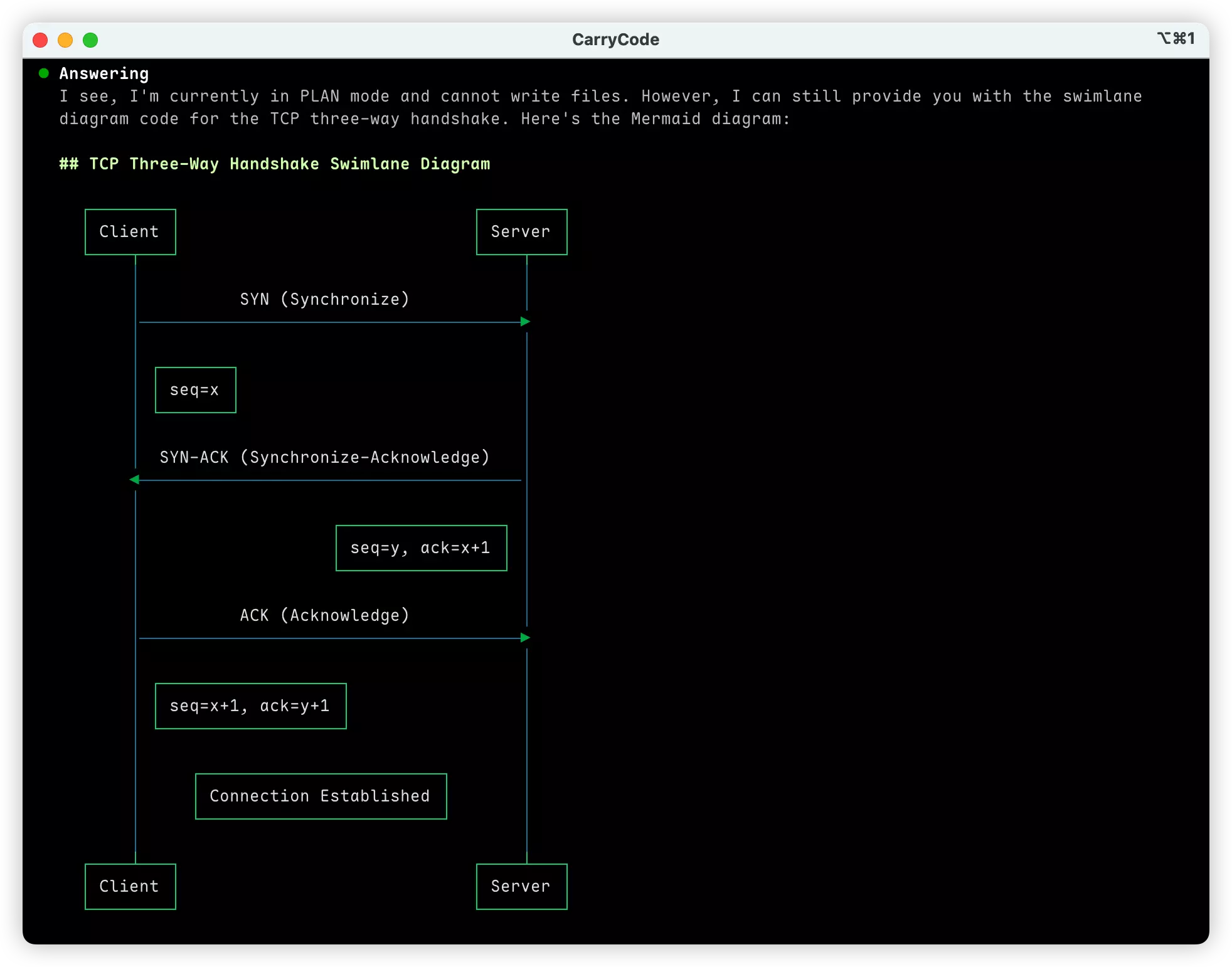
8. 📈 Mermaid Diagram Terminal Rendering
Section titled “8. 📈 Mermaid Diagram Terminal Rendering”View Mermaid diagrams directly in your terminal:
- Terminal-Native Rendering: ASCII-based diagrams without browser
- Chinese Character Support: Optimized alignment for CJK characters
- Smart Layout Handling: Dynamic width management and label preservation
- Graceful Fallback: Plain text fallback when rendering fails
- Beautiful Themes: Terminal color scheme integration
9. 🔄 Session Checkpoints & Rollback
Section titled “9. 🔄 Session Checkpoints & Rollback”Advanced session management capabilities:
- User Turn Checkpoints: Automatic checkpoint creation at user interactions
- Rollback Mechanism: Revert to any previous checkpoint state
- Session Snapshots:
- Compact, space-efficient storage
- Provider and model metadata preservation
- Source/target revision tracking
- Soft-Delete Recovery: Reactivate previously cleared sessions
- Async Approval: Non-blocking approval mode handling
10. 🎨 Terminal Background Detection
Section titled “10. 🎨 Terminal Background Detection”Intelligent terminal theming:
- Background Color Detection: Automatic light/dark theme detection
- OSC Sequence Support: Uses terminal escape sequences for detection
- Theme Adaptation: UI components adapt to terminal background
- State Preservation: Maintains paused state during detection
🔧 Additional Enhancements
Section titled “🔧 Additional Enhancements”Code Highlighting & Rendering
Section titled “Code Highlighting & Rendering”- New
summarySyntax: Specialized highlighting for operation summaries - Word-Boundary Wrapping: Improved readability for long lines
- Comment Color Differentiation: Distinct styling for comments vs base text
- Plaintext Handling: Better support for plain text output
- Regex Highlighter: Enhanced syntax highlighting for various languages
CLI Improvements
Section titled “CLI Improvements”- Restructured Argument Parsing: More robust CLI command handling
- New Commands:
help,version,once,updatewith full functionality - Quick Start Guide: Built-in help with structured shortcuts
- i18n Support: Full localization for CLI messages
Session Event Handling
Section titled “Session Event Handling”- Enhanced Subscription Management: Better event listener handling
- Error Tracking: Improved error propagation and logging
- Metadata Updates: Session metadata updates without full reload
- Message Appending: Efficient message addition without re-rendering
Model Configuration
Section titled “Model Configuration”- Simplified Configuration: Removed
ui_model_nameandapi_model_namefields - Provider Information: Enhanced provider/agentl tracking in sessions
- Usage Extraction: Improved token usage parsing for Ollama
🐛 Fixes & Improvements
Section titled “🐛 Fixes & Improvements”- Bash Tool: Simplified command banning logic, enhanced syntax validation with custom error handling
- Browser Tool: Removed command confirmation requirement for smoother workflows
- Latency Display: Cleaner output without providerId clutter
- Tool Detection: Simplified logic in RichArea component
- Response Summaries: File counts and row ranges in summaries
- Session Stability: Improved test stability for snapshot handling
📦 Dependency Updates
Section titled “📦 Dependency Updates”- Added
beautiful-mermaidfor diagram rendering - Updated Playwright and Puppeteer to latest versions
- Enhanced test infrastructure with 20+ new test files
📝 Developer Updates
Section titled “📝 Developer Updates”- CI/CD: Scheduled cleanup workflow for old artifacts and caches
- Test Coverage: Comprehensive tests for:
- Browser automation
- Token estimation
- Tool result formatting
- Mermaid rendering
- Session management
- Code Quality: Refactored core modules for better maintainability
- Documentation: Updated AGENTS.md and SKILL.md with clearer instructions
🎯 Upgrade Guide
Section titled “🎯 Upgrade Guide”Automatic Upgrade
Section titled “Automatic Upgrade”# Using the install scriptcurl -fsSL https://carrycode.ai/install.sh | bash
# Or for Windowsirm https://carrycode.ai/install.ps1 | iexVerify Installation
Section titled “Verify Installation”carry --version🙏 Acknowledgments
Section titled “🙏 Acknowledgments”Thanks to all contributors who made this release possible! Special thanks for the extensive work on browser automation, SkillHub integration, slash commands, and token management.
Happy coding with Carry Code v0.7.5! 🎉